

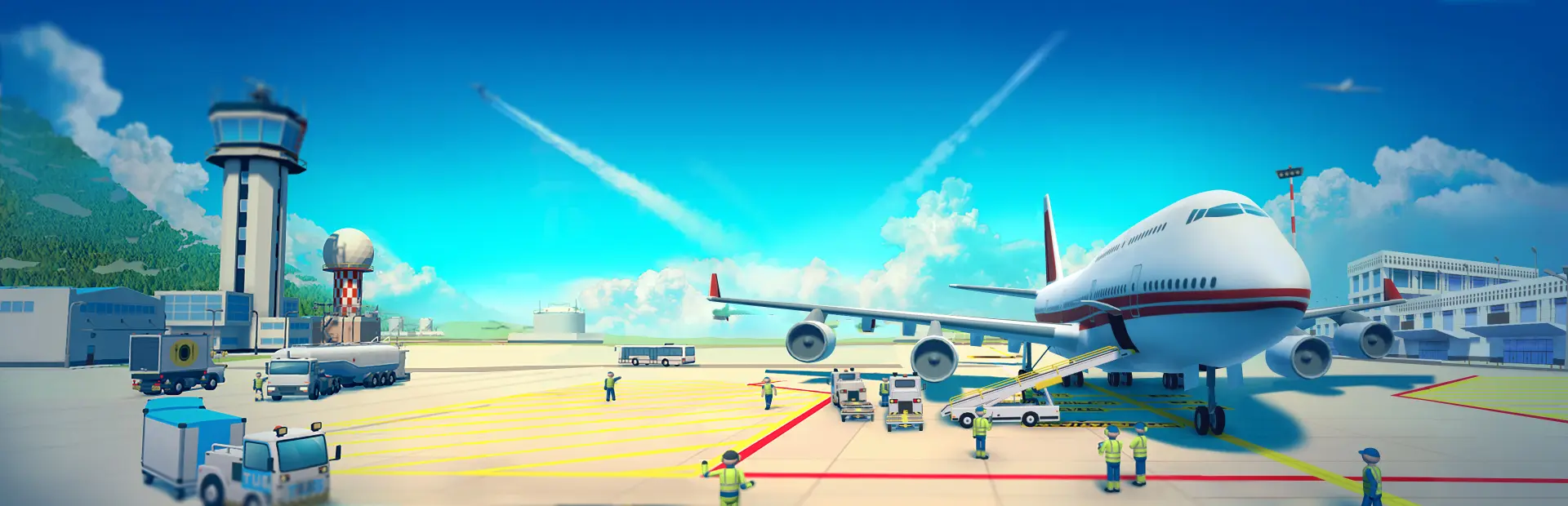
Sky Haven Tycoon - Airport Simulator
Sky Haven Tycoon - Airport Simulator Free Download - Overview
Build every part of your own airfield. Construct everything from landing strips, control towers, roads, parks, terminals, gates, buildings and much more. Buy extra land to expand your airport to city size and manage a world of planes, pax and cargo.
But you can go even deeper. Not only can you plan the entire layout of your airport, but you can also design the smallest details in the terminals to get the most optimal passenger flow. Manage the entire airport to keep clients and passengers happy and satisfied in order to create a healthy economy. Make sure there is a bus or car for every man or woman that needs to get to a terminal, check if you have the fuel needed, transport their luggage safely and so on.
A well managed place for planes is a direct route to success.
The strategy you create matters and determines how your airport looks and works. Remote or bridged ramps? Charter or regular flights? Big or small aircrafts? Domestic passengers or connected flights? Fly single planes or entire airlines? You are the manager of this tycoon/simulation and the world is your sandbox.
Screenshots
System Requirements
- OS Windows 7 or newer
- Processor Intel i5-2300/AMD FX-4300
- Memory 8 GB RAM
- Graphics nVidia GTX 560 (2GB)/AMD Radeon 7850
- DirectX Version 10
- Storage 2 GB available space
- Sound Card DirectX Compatible
- Additional Notes Requires a 64-bit processor and operating system
- Additional Notes Requires a 64-bit processor and operating system
How to Install
Download Sky Haven Tycoon - Airport Simulator (1.20 GB) using the download button.
Extract the archive with WinRAR or 7-Zip.
Open the extracted game folder and run
SkyHaven.exe.
Game Data & Settings
Change Language: Edit the file located at
steam_settings/Configs.user.ini.Save Data Location:
%USERPROFILE%/My Documents/RealWelders\SkyHaven\Saves
You might also like




Comments
Sign in to join the conversation.
No comments yet. Be the first to say something.